Web accessibility is defined as a feature of a website that makes it usable for people experiencing any type of disability, whether temporary or permanent. The concept of accessibility arises to eliminate access difficulties for individuals with disabilities (both sensory and physical), but it also offers additional advantages for web users without disabilities. In 2008, an international organization, the W3C, defined a set of design rules, the WCAG 2.0, to be followed to achieve an accessible web. The main goal of the Final Degree Project is to create a web accessibility analysis and improvement application. This application is generated from a development framework defined in a doctoral thesis presented at the UIB.
Web browsers’ accessibility options
Browsers such as Explorer, Netscape, Mozilla, FireFox, Opera, etc., incorporate different accessibility options that allow customization of the program, access, and page display. Some are common resources in Windows, but others are related to HTML code.
Toolbar Browsers have different toolbars with specific functions: tools, addresses, favorites, history, and many others. These bars can be cumbersome as they reduce the window where the web page is displayed and complicate the user interface. To avoid these annoyances, they can be hidden.
On the contrary, the standard toolbar can be used when people prefer to use the graphic language of icons as an alternative to the textual language of menus. You can activate “full-screen view,” F11, which hides the menu bar and other toolbars, simplifying the environment and expanding the screen area. Some toolbars can be customized:
The standard toolbar contains navigation tools. In some programs, you can add, remove, and rearrange buttons, use large or small icons, and show or hide label text. In Explorer and Firefox, access it from the View | Toolbar | Customize menu.
The links bar is a small space where you can save links to the most visited websites. In Internet Explorer, you can change the icons to make them understandable.
Favorites. It is a spacious area that allows you to organize web addresses of interest. Customizing these tools allows you to create a list of links, with meaningful icons, facilitating quick access to web pages without having to type the addresses. “Autocomplete” is another option that saves time when typing since, as you type, it shows a list of matching entries where you can select your text.
5.5.2.1. Web page display.
Browsers have options to improve the display of web pages as long as they adhere to accessibility guidelines. It is possible to:
Adjust the font size, or CTRL+ / CTRL– in many browsers, or from the View | Text Size menu. Change the text and background color of the web page if high-contrast colors are needed. Tools menu | Internet Options | Colors. Associate a style sheet to display web information with fonts and colors according to our needs.
5.5.2.2. Mouse-free access.
People who cannot use the mouse have keyboard shortcuts to access program options and navigate the web. It is commonly used by blind people and also by those who use programmable virtual keyboards.
Web browsers have their own keyboard methods to navigate the web page in addition to the usual document scrolling.
Table 5.5.2.2.a. List of some keyboard combinations to navigate the web
SHIFT+TAB -> Move backward between elements on a web page
ENTER -> Activate a selected link.
ESC -> Stop the download of a page.
F5 -> Refresh the current page.
ALT +D -> Go to the address bar.
ALT+LEFT ARROW -> Go to the previous page.
SHIFT+F10 -> Show a context menu for a link.
CTRL+TAB -> Move between frames.
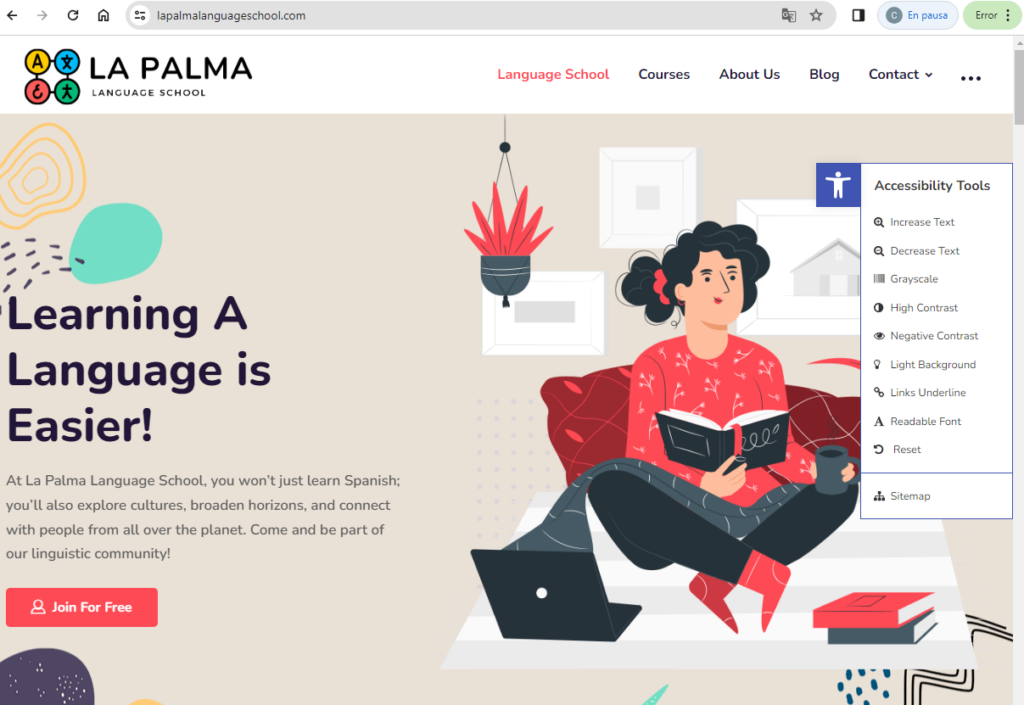
Accessibility tool Allows you to establish things like:
Change the font size (increase/decrease) Grayscale Negative contrast High contrast Light background Underlined links Readable font Link to Site Map, Comments, and/or Help pages The accessibility toolbar makes it very easy to find and change all kinds of accessibility settings. Its other features give it the ability to enable skip to content, add focus outline for focusable elements, remove link target attributes, and add reference roles to links.